
National Clean Out Your Computer Day, observed on 9 February 2026, serves as a practical reminder that digital hygiene is not optional for organizations supporting the Department of Defense. For defense contractors subject to the Cybersecurity Maturity Model Certification (CMMC), routine system cleanup directly supports compliance, audit readiness, and data protection.
Originally established in 2000 by the Institute for Business Technology, this observance highlights the importance of maintaining both physical and digital computing environments. For organizations handling Federal Contract Information (FCI) and Controlled Unclassified Information (CUI), these practices align directly with CMMC Level 2 and Level 3 control requirements.
This article explains why digital hygiene matters, outlines structured cleanup actions, and demonstrates how SecureITSM enables continuous compliance through standardized managed services and its AgileDefend framework.
Why This Day Matters for Digital Hygiene in the Defense Industrial Base
Digital hygiene is a foundational operational discipline for organizations within the Defense Industrial Base. For defense contractors handling Federal Contract Information and Controlled Unclassified Information, routine system cleanup directly supports system stability, cybersecurity resilience, and CMMC audit readiness. National Clean Out Your Computer Day reinforces practices that should already exist as part of a managed compliance program.
1. System Performance and Reliability
Dust accumulation restricts airflow and causes hardware components to operate outside approved thermal tolerances, increasing failure rates and unplanned downtime. Excessive storage utilization limits operating system efficiency by reducing available resources for virtual memory, logging, and secure workloads. Browser caches, temporary files, and unmanaged downloads consume disk space and degrade system responsiveness. Over time, degraded performance increases support overhead and disrupts mission-critical operations supporting DoD contracts.
2. Cybersecurity and Data Protection Risk
Unpatched operating systems and unused applications introduce exploitable vulnerabilities that are routinely leveraged by threat actors. The Cybersecurity and Infrastructure Security Agency consistently identifies unpatched software as a primary attack vector. Retained, unnecessary data expands the attack surface and increases breach impact. Removing obsolete files and applications reduces exposure and directly supports data confidentiality and integrity requirements.
3. CMMC Compliance Exposure
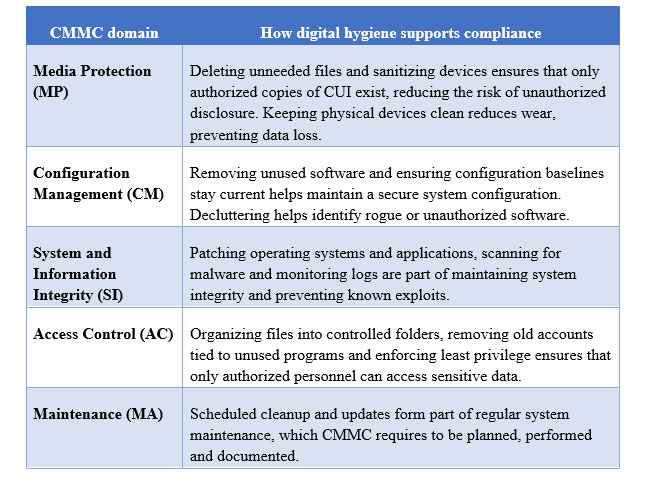
CMMC Level 2 requires demonstrable control across media protection, configuration management, system integrity, and access control domains. Retained copies of Controlled Unclassified Information outside approved locations increase assessment scope and audit complexity. Unmanaged endpoints and undocumented system changes frequently result in assessor findings. Routine, documented cleanup supports defensible evidence and reduces remediation effort during C3PAO assessments.
4. Environmental and Operational Efficiency
Excess digital storage increases infrastructure demand, operational costs, and energy consumption. The International Energy Agency estimates that data centers consume approximately one to one and a half percent of global electricity. Structured digital cleanup reduces unnecessary storage utilization and simplifies compliance scope. For defense contractors, efficient environments are easier to secure, monitor, and maintain over time.
CMMC Managed Service Provider (MSP) Perspective
As a CMMC-focused Managed Service Provider (MSP), SecureITSM supports defense contractors that face rising compliance complexity and documentation burdens. Through standardized Microsoft GCC & GCC High environments, zero trust architecture, and an automated Documentation Manager Application, SecureITSM enables:
- Up to 85 percent automation of CMMC evidence collection
- 70 to 80 percent reduction in audit preparation effort
- Continuous compliance through integrated SOC and RMM platforms
- Unified patching, antivirus, vulnerability management, and monitoring
This approach transforms digital hygiene from an annual task into an operational control set aligned with NIST SP 800-171.
What to Do on National Clean Out Your Computer Day
1. Power down and clear physical dust
Before interacting with any hardware components, shut down systems and disconnect all power sources. Dust is a leading physical risk to computing equipment; field studies show that it restricts airflow in vents and cooling fans, forcing components to operate outside approved thermal limits. Use compressed air or electronics-safe vacuum tools to remove dust from cases, fans, and peripherals. Clean keyboards and pointing devices using disinfectant wipes, as frequently touched surfaces can harbor contaminants and impact workplace hygiene.
2. Declutter your files
- Audit documents and downloads: Review downloads folders, desktops, and shared drives. Delete obsolete files and archive required records into approved secure storage locations. Cybersecurity best practices recommend permanently emptying recycle bins to ensure unnecessary data is fully removed.
- Organize folders: Create a structured folder hierarchy that clearly separates Controlled Unclassified Information from non-sensitive data, such as “Contract XYZ – CUI” and “Administrative.” Apply consistent naming conventions and separate active projects from archived materials to reduce misplacement risk and improve operational efficiency.
- Remove duplicates: Duplicate documents and media unnecessarily consume storage and expand compliance scope. Use approved duplicate-detection tools to identify and safely remove redundant files.
3. Uninstall unused programs and browser extensions
Unused applications and extensions increase the attack surface and may contain unpatched vulnerabilities. Outdated software can expose sensitive data and undermine configuration baselines. Review installed programs and remove software that is no longer required for business operations. Disable unnecessary startup services and remove unneeded browser extensions to support secure system configurations.
4. Update and patch everything
Routine updates are essential for protecting systems against known exploits. Enable automatic updates for operating systems, applications, and endpoint protection tools. Apply security patches promptly and validate update success. Patch management directly supports System and Information Integrity controls and reduces exposure to known exploited vulnerabilities.
5. Empty caches and cookies
Web browsers store cached files, scripts, and cookies to improve performance, but over time, this data consumes disk space and can result in outdated or inconsistent content delivery. Periodically clear browser caches and cookies and review stored credentials. Use an enterprise-approved password manager where applicable.
6. Scan for malware and backup critical data
Perform full endpoint malware scans using approved security tools. Verify data protection by following the 3-2-1 backup rule, maintaining three copies of data on two different media types with one copy stored off-site. Validated backups ensure data availability during ransomware incidents, hardware failures, or accidental deletions.
7. Make a digital cleanup routine
National Clean Out Your Computer Day serves as a checkpoint, not a one-time activity. Schedule monthly or quarterly maintenance cycles to institutionalize digital hygiene. Within a CMMC framework, continuous monitoring and documented changes align with AgileDefend Monitor and Enhance phases, supporting sustained audit readiness and compliance continuity.
Connecting digital hygiene to CMMC compliance
CMMC Level 2 and Level 3 controls emphasize safeguarding CUI, maintaining system integrity and ensuring proper media sanitation. Some relevant domains include:
SecureITSM’s role in continuous compliance
SecureITSM isn’t just an IT provider; we are a CMMC MSP delivering a defense-grade compliance platform purpose-built for DoD and federal contractors. We help organizations with 10–100 systems stay secure, achieve CMMC compliance, and remain audit-ready throughout the year. Observances like National Clean Out Your Computer Day reinforce the same operational discipline required for continuous compliance.
Our standardized Microsoft GCC High environments, zero-trust security, and automated Documentation Manager App reduce the manual documentation burden associated with CMMC Level 2 requirements, cutting audit preparation costs by up to 80 percent.
Integrated SOC and RMM capabilities support real-time monitoring, patch management, and vulnerability remediation. Our ISSO-as-a-Service and virtual CISO programs provide ongoing oversight and risk management.
By partnering with SecureITSM, organizations can transform National Clean Out Your Computer Day from a one-time activity into a repeatable compliance practice.
Our services ensure that patching, backups, antivirus scans, and system configuration changes are documented and aligned with NIST SP 800-171 requirements. On National Clean Out Your Computer Day and every operational day that follows, SecureITSM provides the structure and expertise needed to maintain secure, compliant, and efficient systems.
Conclusion
National Clean Out Your Computer Day on 9 February 2026 is the perfect moment to reflect on your digital hygiene. It is a practical checkpoint for strengthening cybersecurity posture and reinforcing CMMC compliance. A clean computer runs faster, protects data and supports compliance.
For DoD federal defense contractors, these practices directly align with CMMC Level 2 and Level 3 controls and help maintain audit readiness and contract eligibility.
If you’re unsure where to start or need help aligning your digital cleanup with CMMC requirements, schedule a CMMC consultation with SecureITSM to align your digital hygiene efforts with a structured, defense-grade compliance framework.